
Industry Context & The Contact Center Crisis
Global tele-calling operations and customer contact centers are encountering systemic operational inefficiencies that erode corporate operating margins, compromise lead acquisition quality, and cause customer dissatisfaction.
The High-Turnover Tele-calling Cycle
Modern outbound tele-marketing and tele-sales teams operate under severe psychological strain. Human agents are expected to place 150 to 250 manual calls daily. Of these, less than 20% connect to live prospects, and fewer than 5% express qualified buying intent. This creates rapid agent burnout, resulting in an annualized turnover rate exceeding 45% across international business process outsourcing (BPO) centers.
The Static Keypad IVR Bottleneck
Traditional DTMF IVR systems are universally detested by consumers. Callers are forced through lengthy recorded menus before reaching a representative, resulting in average drop-off rates of 32%. Furthermore, keypad IVRs are incapable of understanding nuance, interpreting urgent problems, or cross-referencing caller history in real time.
The Business Impact of Dropped Callbacks
When a prospect says 'call me back at 6 PM', in 70% of legacy operations that lead is lost. Human agents take unstructured notes on paper or fail to set reminders. Without automated parsing, callbacks slip through the cracks, wasting valuable customer acquisition investments.
What Is Sky Pro AI Calling Agent? Vision & Scope
Sky Pro AI Calling Agent is an enterprise-grade autonomous telephony platform engineered from the ground up to deliver bidirectional, real-time conversational voice experiences at scale. It acts as an automated digital workforce, conducting complex conversations with sub-800 millisecond response times.
Core Technological Pillars
- Streaming Ingestion: Captures audio at 16kHz/8kHz over WebSockets and SIP trunks with continuous VAD.
- Cognitive Reasoning: Google Gemini LLM instances understand nuance, extract intent, and maintain dialogue memory.
- Neural Voice Synthesis: Streams lifelike neural audio back to the caller, mimicking human pacing and intonation.
- Active Interruption (Barge-In): Allows callers to interrupt the AI at any time, instantly halting voice output.
- Integrated Telephony ERP: Campaign scheduling, lead uploads, call logs, and callback registries in one interface.
Strategic System Objectives
Sky Pro AI Calling Agent transforms enterprise customer communications by replacing rigid keypad trees with natural conversations. Human staff are freed to focus on high-value escalations, closing deals, and managing strategic client relationships.
Enterprise Problems vs. Platform Solutions
Every feature maps to a specific operational failure observed in traditional tele-calling environments.
| Operational Failure | Traditional BPO Approach | Sky Pro Solution |
|---|---|---|
| Inconsistent Pitch Quality | Tired agents skip key qualification points; pitches vary wildly. | Deterministic prompt directives ensure consistent delivery on every call. |
| Unstructured Callback Losses | Manual notes on spreadsheets; callbacks frequently forgotten. | NLP temporal extraction automatically captures commitments into the Callback Scheduler. |
| Speech Collisions & Talk-over | High latency causes machine and human to speak simultaneously. | Client-side AudioWorklet barge-in instantly purges output audio buffers. |
| Lead Upload Bottlenecks | IT teams manually run SQL scripts to populate dialer lists. | SheetJS (excelParser.ts) allows drag-and-drop spreadsheet ingestion directly in browser. |
| Lack of Granular Telemetry | Call records only log connection time; outcomes unanalyzed. | Turn-by-turn dialogue logging, latency breakdowns, and auto disposition tagging. |
Detailed User Personas & Access Control
Sky Pro AI Calling Agent enforces role-based access control across three primary user tiers.
Persona 1: Voice Systems Administrator (super_admin)
Scope: Telephony infrastructure, SIP gateways, LLM system directives, and server maintenance.
Permissions: Full, unrestricted access to all backend routes, logs, database migrations, and operational settings.
Persona 2: Campaign & Sales Manager (campaign_manager)
Scope: Outbound dialer operations, lead ingestion, schedule pacing, and conversion tracking.
Permissions: Access to Metrics, Dialer Queue, Scheduler, Calls, and Reports. Restricted from DSP configurations.
Persona 3: Quality & Compliance Analyst (qa_analyst)
Scope: Dialogue verification, compliance tracking, and conversational auditing.
Permissions: Read-only access to Call History, Conversation Modals, Reports, and analytical exports.
Technology Stack & Architectural Topology
A decoupled, high-performance client-server topology designed for low-latency streaming and high concurrent throughput.
 React 18
 TypeScript
 Tailwind CSS
 FastAPI
 Python 3.11
 PostgreSQL
 DockerReact 18TypeScriptTailwind CSSFastAPIPython 3.11PostgreSQLDocker
| Subsystem | Technology / Library | Operational Functionality |
|---|---|---|
| Frontend Runtime | React 18 + Vite + TypeScript | SPA providing fast UI rendering and state handling. |
| UI & Components | Tailwind CSS + Lucide Icons | Responsive, modern interface styling for dashboards. |
| File Ingestion | SheetJS (xlsx) | Client-side Excel parsing transforming spreadsheets into dialer queues. |
| Backend Core | FastAPI (Python 3.11) | Asynchronous REST endpoints and WebSocket stream controllers. |
| AI Reasoning | Google Gemini 1.5 Pro / Flash | Context-aware dialogue understanding and response generation. |
| Voice Pipeline | Streaming STT & Neural TTS | Real-time bidirectional speech-to-text and text-to-speech. |
| Database ORM | SQLAlchemy + Alembic | Relational mapping, query execution, and migration tracking. |
| Web Server Proxy | Nginx (Alpine) | High-performance reverse proxy routing HTTP and WebSocket traffic. |
| Containerization | Docker + Docker Compose | Isolated multi-container production environments. |
Directory Structure & Repository Layout
Clean architectural layout separating backend voice pipelines, frontend user interfaces, and production deployment scripts.
AI-Call-Agent-main/
■■■ .github/workflows/deploy.yml # Automated CI/CD build, container publish, and deployment
■■■ backend/ # Python FastAPI application core
■ ■■■ Scripts/
■ ■ ■■■ inbound_prompt.txt # Behavioral directives for incoming support and inquiries
■ ■ ■■■ outbound_prompt.txt # Tele-sales qualification, objection handling, and pitch
■ ■■■ api_routes.py # REST endpoints for metrics, calls, queues, and reports
■ ■■■ database.py # SQLAlchemy models, database connection pool, migrations
■ ■■■ logging_config.py # Centralized logging engine with rotating file output
■ ■■■ main.py # FastAPI lifespan handlers, CORS settings, and router mounts
■ ■■■ voice.py # Real-time WebSocket audio, STT/TTS, and Gemini logic
■ ■■■ requirements.txt # Python backend dependencies
■ ■■■ Dockerfile # Multi-stage container definition for backend services
■■■ frontend/ # React 18 TypeScript frontend
■ ■■■ src/components/
■ ■ ■■■ CallHistory.tsx # Paginated call audit log with audio playback controls
■ ■ ■■■ CallLogs.tsx # Technical trace logs and latency monitoring
■ ■ ■■■ ConversationModal.tsx # Turn-by-turn dialogue bubble modal viewer
■ ■ ■■■ LiveSimulator.tsx # Browser sandbox for testing microphone input/audio
■ ■ ■■■ Metrics.tsx # Executive dashboard KPI widgets and performance analytics
■ ■ ■■■ Reports.tsx # Advanced multi-parameter filter engine with CSV export
■ ■ ■■■ ScheduleTracker.tsx # Outbound campaign scheduler and callback manager
■ ■ ■■■ TeleforceAgent.tsx # Softphone dialer overlay and line status monitor
■ ■■■ src/utils/excelParser.ts # Client-side spreadsheet parser for contact lists
■ ■■■ src/types.ts # TypeScript type definitions for calls, metrics, and contacts
■ ■■■ src/App.tsx # Master route coordinator and view switcher
■ ■■■ nginx.conf # Reverse proxy configuration for frontend assets and API routing
■ ■■■ Dockerfile # Multi-stage static asset build using Nginx Alpine
■■■ deploy/
■ ■■■ docker-compose.yml # Production container composition
■ ■■■ migrate-data.sh # Automated database backup and migration script
■■■ build-and-push.ps1 # PowerShell script for automated Docker image delivery
Platform Modules & Visual Dashboards
Explore the 6 core functional modules of the Sky Pro AI Calling Agent ERP system.
Call Center Overview & Live Metrics
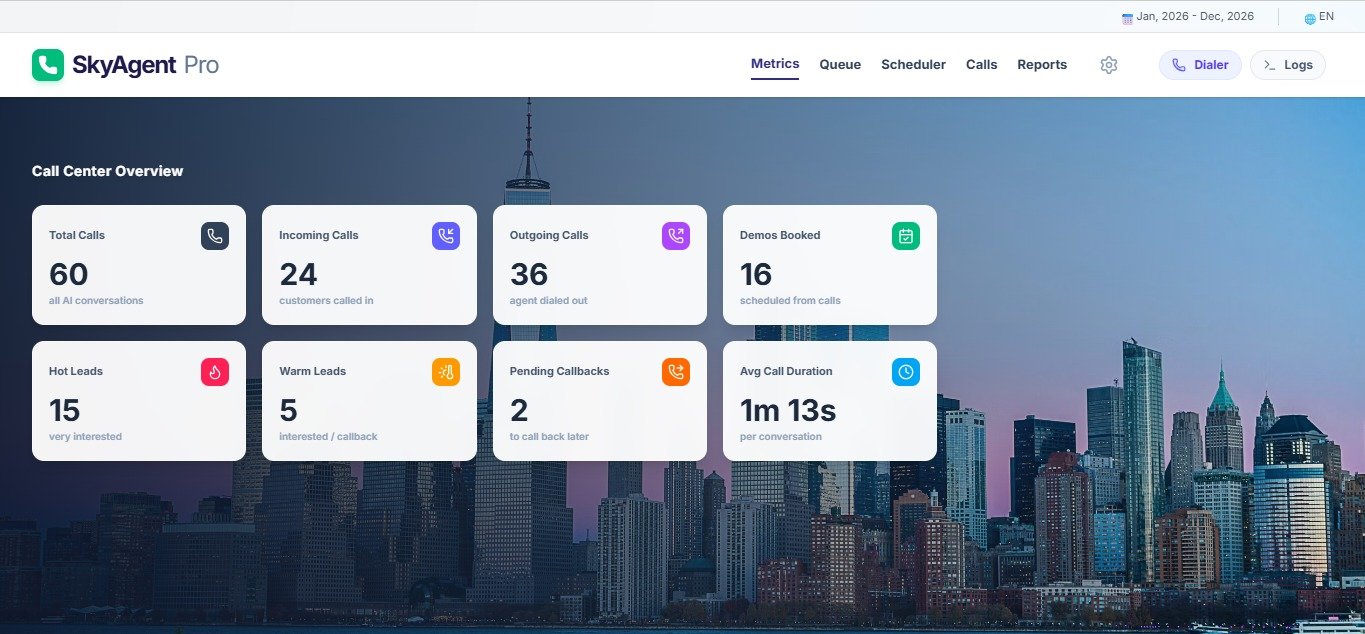
Operational Purpose: The Metrics Dashboard is the central command cockpit for contact center supervisors providing real-time visibility into call volumes, lead conversions, and engagement.
KPI Widget Specifications
- Total Calls (60): Cumulative completed voice sessions.
- Incoming Calls (24): Inbound customer inquiries handled autonomously.
- Outgoing Calls (36): Outbound campaign calls placed by the automated dialer.
- Demos Booked (16): High-intent prospects scheduled for demonstrations.
- Hot Leads (15): Callers with immediate purchasing intent.
- Warm Leads (5): Prospects requesting follow-up information.
- Pending Callbacks (2): Callers queued in the scheduler.
- Avg Call Duration (1m 13s): Mean conversation time.
Predictive Dialer Queue & File Ingestion
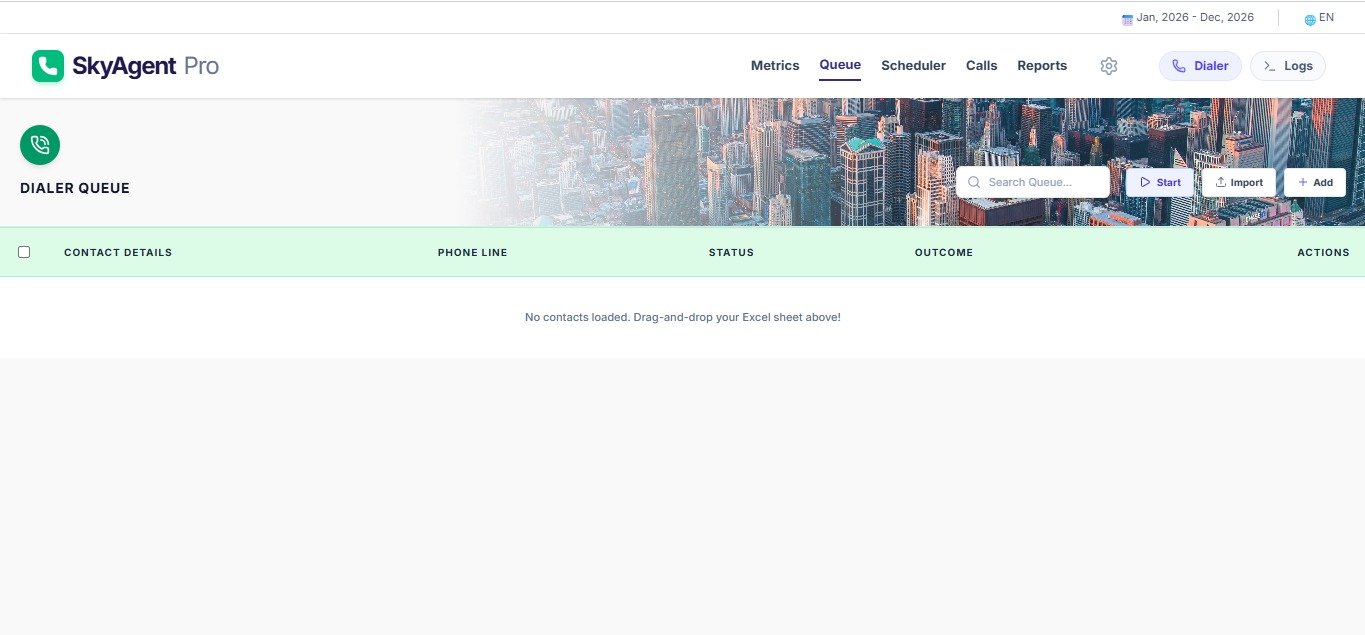
Operational Purpose: The Dialer Queue eliminates manual database imports by enabling campaign managers to drag and drop contact spreadsheets directly into the browser via excelParser.ts.
Action Toolbar & Controls
- Search Queue: Real-time filter across names, numbers, and variables.
- Start / Pause: Starts pacing dialer based on concurrency limits.
- Import: opens file picker to upload .xlsx, .xls, or .csv files.
- + Add: Form modal for manually adding contacts to the queue.
Autonomous Callback Scheduler
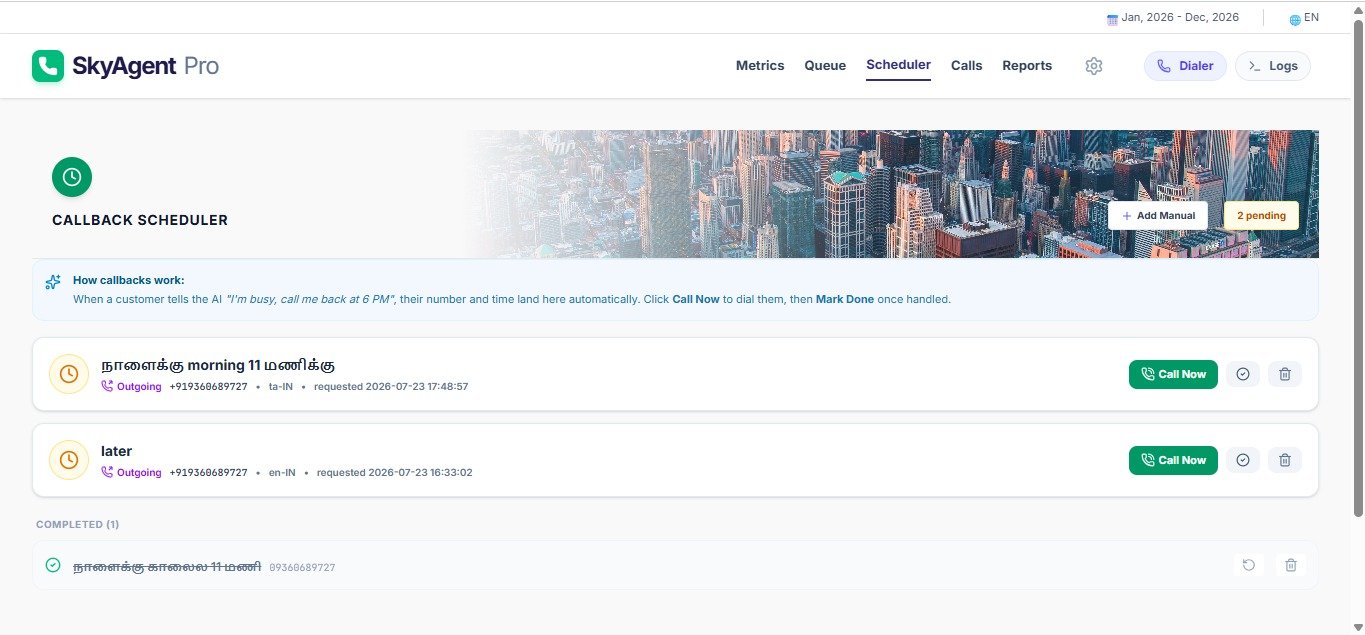
Operational Purpose: When prospects state they are unavailable, the Callback Scheduler captures the follow-up commitment. Gemini detects the intent, extracts the temporal target, and adds the contact to the queue.
How Automated Callbacks Work
- User provides a verbal callback constraint during an active call.
- Speech pipeline transcribes the phrase and routes it to the LLM.
- System parses the target time and creates a PENDING record in callbacks table.
- Dashboard updates its callback counter in the banner.
- Operators trigger via Call Now or resolve via Mark Done.
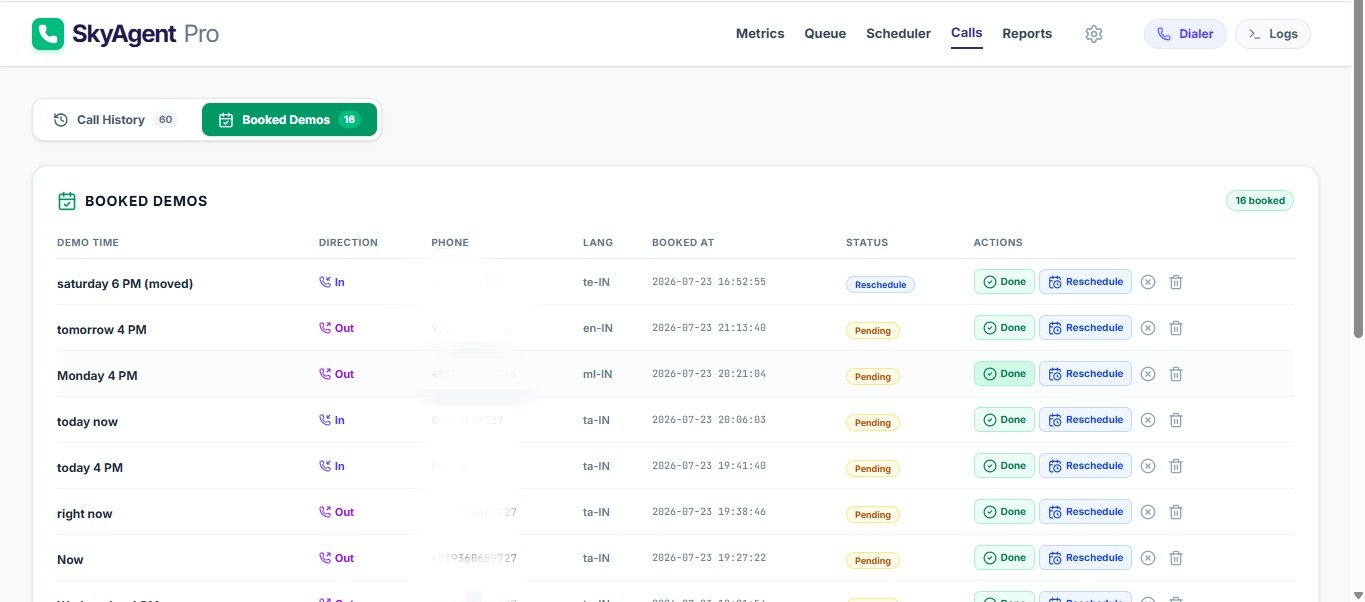
Call History & Booked Demos Ledger
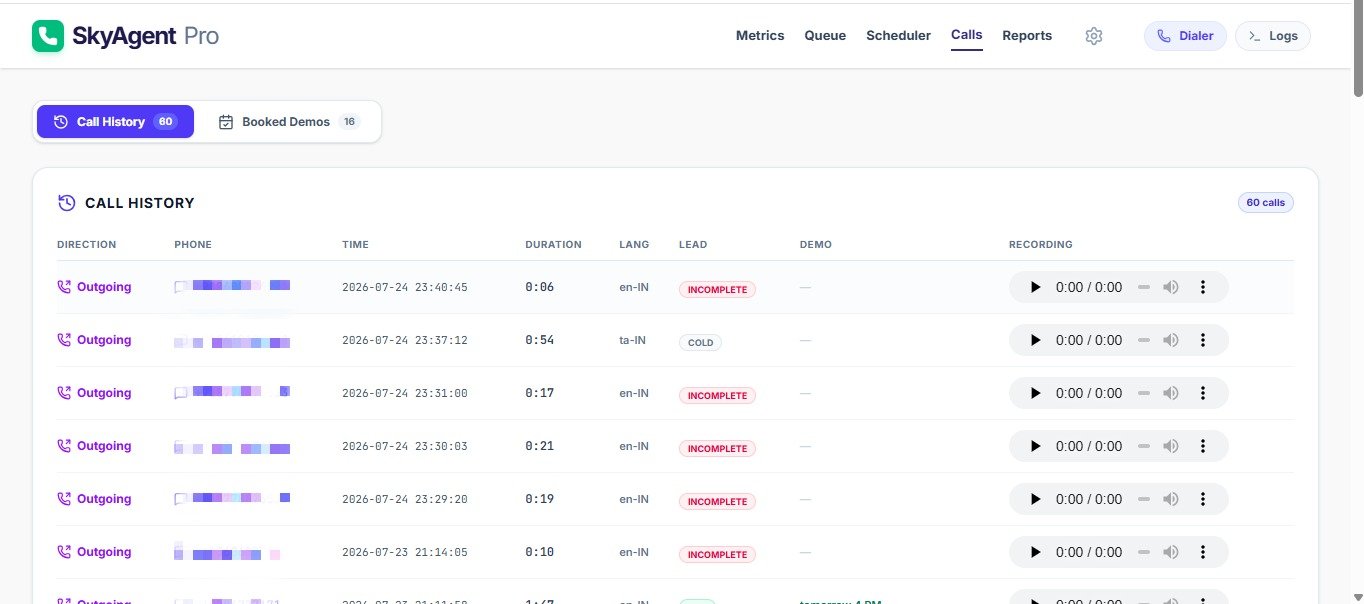
Operational Purpose: The Calls Ledger provides a detailed record of every completed voice interaction. Supervisors can review audio recordings, evaluate qualification accuracy, and inspect outcomes.
Tab Architecture & Field Specifications
- View Toggles: Switch between Call History (60) and Booked Demos (16).
- Direction: Incoming vs Outgoing visual tag.
- Duration & Lang: Call length and primary language detected.
- Lead & Demo: AI qualification state (Hot/Warm/Cold) and demo flag.
- Recording: Interactive audio player for compliance auditing.
Softphone Keypad & Agent Connect
Operational Purpose: The Softphone Keypad allows voice engineers to initiate manual test calls, verify speech pipeline configurations, and connect live agents to ad-hoc numbers.
Keypad Specifications
- Country Code Selector: Pre-configured with international routing (e.g., +91).
- DTMF Keypad: Full 12-key numeric interface (0-9, *, #).
- Connection Status: Real-time SIP/WebRTC link status monitor.
- Connect Agent: Launches bidirectional audio streaming.
Reports, Analytics & CSV Data Export
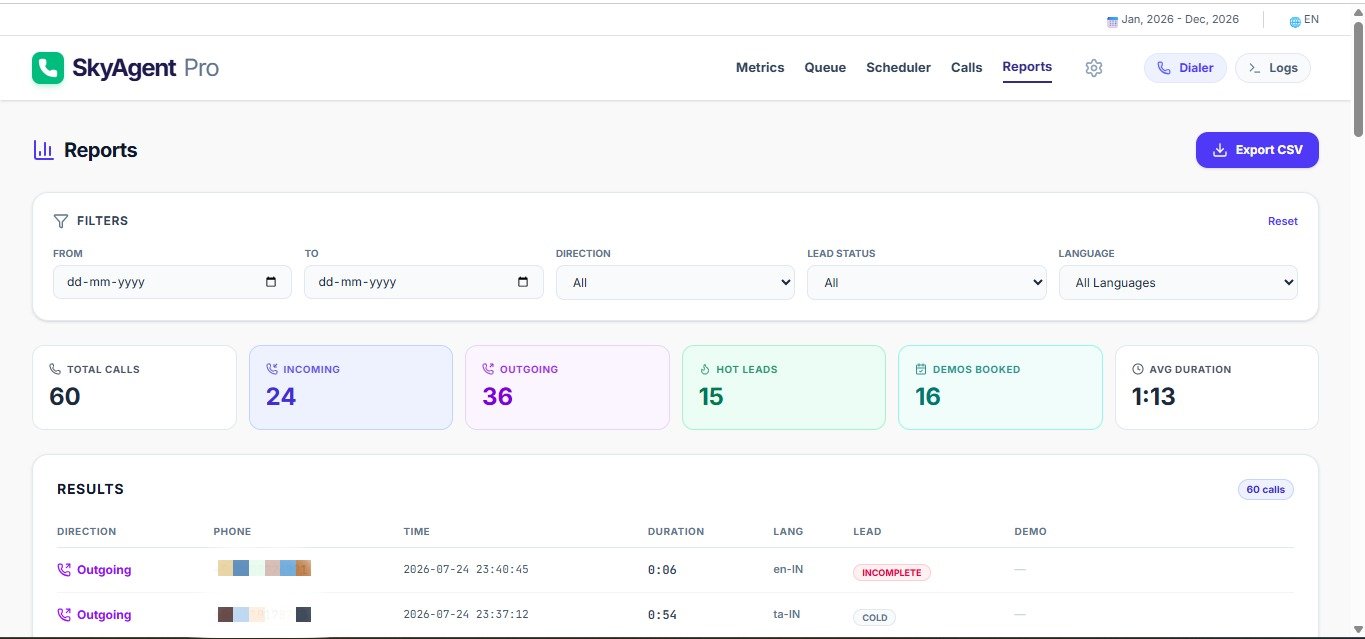
Operational Purpose: The Reports module is the platform's BI suite, allowing campaign managers to filter data across multiple parameters and export datasets for external CRM integration.
Multi-Parameter Filtering Engine
- Date Range: Granular From and To date inputs for historical querying.
- Direction: Filter All Calls, Incoming Only, or Outgoing Only.
- Lead Status: Segment by Hot, Warm, Cold, or Booked Demos.
- Language: Filter records by detected language.
- Export CSV: Generates structured spreadsheet with call records and outcomes.
Inbound Voice Pipeline & IVR Replacement
The inbound pipeline replaces rigid keypad menus with natural, open-ended conversational routing.
1
Call Ingestion
Customer dials in; SIP gateway routes the call via WebSocket to the FastAPI backend.
2
Greeting & Intent Capture
Agent introduces itself using inbound_prompt.txt: 'Hello! How can I help you today?'
3
Streaming Audio Processing
Caller's voice is processed into streaming audio chunks and STT converts audio to text.
4
Intent Recognition
Gemini LLM parses the transcript, matching the request against knowledge bases.
5
Voice Synthesis & Response
Neural TTS synthesizes the response, streaming audio back with sub-800ms latency.
6
Call Wrap-Up
Conversation is summarized, classified, and saved to call_logs.
Outbound Campaign Dialer Pipeline
The outbound pipeline automates lead qualification and sales outreach at scale.
1
Lead List Upload
Campaign manager uploads an Excel lead list in the Dialer Queue interface.
2
Pacing Initiation
Clicking Start triggers the outbound dialer up to configured concurrency limits.
3
Live Answer Detection
VAD distinguishes between live human speech and voicemail systems.
4
Pitch Delivery
Agent initiates using outbound_prompt.txt, confirming identity and presenting the pitch.
5
Objection Handling
LLM addresses questions regarding pricing, features, and timing.
6
Demo Scheduling or Callback
If interested, agent secures a demo slot. If busy, schedules a follow-up callback.
7
Disposition & Logging
Call assigned disposition tag (Hot, Warm, Cold, Demo Booked) and written to database.
DSP Engine: VAD, Noise Suppression & Echo Cancellation
Sky Pro uses digital signal processing (DSP) to filter background noise and maintain audio quality.
Voice Activity Detection (VAD)
Continuously analyzes incoming audio frames, distinguishing human speech from background silence.
Acoustic Echo Cancellation (AEC)
Prevents the caller's audio from looping back into the microphone when using speakerphones.
Noise Suppression (NS)
Attenuates steady-state background noises such as air conditioning hum or street traffic.
Barge-In Interrupt Controller
Instantly clears audio buffers when the user speaks, ensuring smooth conversational flow.
Low-Latency Mathematical Turn-Taking Model
Sky Pro targets an end-to-end response time under 800 milliseconds.
T_total = T_VAD + T_STT + T_LLM_First_Token + T_TTS_Chunk + T_Network_Buffer < 800 ms
| Pipeline Stage | Target Latency | Optimization Method |
|---|---|---|
| VAD Speech Detection | 50 - 100 ms | Rolling energy thresholds to detect speech start and end. |
| Streaming STT | 150 - 200 ms | Transcribes audio chunks progressively over WebSockets. |
| LLM First Token Generation | 200 - 250 ms | Streams tokens from Gemini as generated, not waiting for complete responses. |
| Neural TTS Synthesis | 100 - 150 ms | Synthesizes audio from initial token chunk while subsequent text generates. |
| Network Buffer & Ingress | 50 - 100 ms | Compact PCM audio packets and optimized WebSocket routing. |
| Total End-to-End Latency | 550 - 800 ms | Natural conversational pacing without awkward pauses. |
Relational Database Schema (ERD Specification)
Database models implemented using SQLAlchemy in backend/database.py.
| Table Name | Primary / Foreign Keys | Attributes & Types |
|---|---|---|
| call_logs | id UUID PK | session_id (VARCHAR UNIQUE), direction (INCOMING/OUTGOING), phone_number, duration_seconds (INT), lead_status (HOT/WARM/COLD), demo_booked (BOOL), recording_url, created_at (DATETIME). |
| callbacks | id UUID PK, call_log_id UUID FK | phone_number, requested_time (DATETIME), status (PENDING/COMPLETED/CANCELLED), notes (TEXT), assigned_agent_id. |
| queue_contacts | id UUID PK | contact_name, phone_line, dial_status (QUEUED/DIALING/COMPLETED/FAILED), retry_attempts (INT), outcome_tag, created_at. |
| transcripts | id UUID PK, call_log_id UUID FK | speaker_role (USER/AGENT), content_text (TEXT), turn_latency_ms (INT), sentiment_score (FLOAT), timestamp. |
REST API Reference & WebSocket Protocol
REST endpoints for state operations; WebSockets for real-time audio streams.
| Endpoint / Route | Method / Protocol | Operational Function |
|---|---|---|
| /api/metrics | GET | Fetches aggregated call center metrics. |
| /api/queue/contacts | GET, POST | Retrieves or batch-inserts contact records. |
| /api/queue/start | POST | Starts outbound pacing dialer execution. |
| /api/scheduler/callbacks | GET, PATCH | Lists pending callbacks and updates statuses. |
| /api/calls/history | GET | Retrieves paginated call logs with recording links. |
| /api/reports/export | GET | Exports filtered call analytics as CSV download. |
| /ws/voice/stream | WebSocket | Full-duplex audio stream for real-time STT and voice playback. |
Standard Operating Procedures (SOPs)
Step-by-step guidelines for administrators, campaign managers, and quality analysts.
Super Admin SOPs
SOP 1: System Health Verification
- Open the administration dashboard and verify API connectivity.
- Review container logs:
docker-compose logs -f backend. - Confirm Google Gemini API keys are active and within rate limits.
- Verify SIP gateways and WebRTC endpoints are registered.
SOP 2: Prompt Configuration & Updates
- Navigate to
backend/Scripts/to inspect active prompt files. - Test modifications in the Live Simulator.
- Commit approved changes and trigger deployment pipelines.
Campaign Manager SOPs
SOP 1: Ingesting Lead Lists & Starting Campaigns
- Open the Queue view in the navigation menu.
- Drag and drop the campaign spreadsheet into the Excel upload zone.
- Review parsed entries to verify contact names and phone numbers.
- Click Start to begin automated dialing.
- Monitor queue statuses: Queued → Dialing → Completed.
SOP 2: Resolving Callbacks
- Open the Scheduler view to inspect pending callbacks.
- Review the prospect's requested callback window.
- Click Call Now or mark completed using Mark Done.
Quality Analyst SOPs
SOP 1: Auditing Turn-by-Turn Transcripts
- Open the Calls ledger and select a completed interaction.
- Open the Conversation Modal to review turn-by-turn dialogue.
- Verify that greeting, qualification, and closing procedures were followed.
- Check for hallucinated information or unhandled objections.
SOP 2: Reviewing Latency Telemetry
- Navigate to CallLogs to inspect technical latency metrics.
- Verify end-to-end response times remained within the 800ms target.
- Flag elevated latency calls for technical review.
Container Ingress, Nginx & Docker Architecture
Sky Pro AI Calling Agent runs as containerized microservices managed via Docker Compose and Nginx.
- Port 80 / 443 (Nginx): Terminates SSL, serves React chunks, proxies API/WebSocket traffic.
- Port 8000 (FastAPI): Manages REST endpoints and bidirectional WebSocket streaming.
- Volume Mounts: Persistent storage for recordings, databases, and rotating logs.
| Command Syntax | Operational Function |
|---|---|
| docker-compose -f deploy/docker-compose.yml up --build -d | Builds and launches containers in detached mode. |
| docker-compose -f deploy/docker-compose.yml ps | Verifies the operational status of all running containers. |
| docker-compose -f deploy/docker-compose.yml logs -f backend | Streams real-time backend API and voice processing logs. |
Disaster Recovery, Backups & Migration Runbook
Procedures for regular database backups, disaster recovery, and data migration.
Generate compressed database backups:
bash deploy/migrate-data.sh --backup
Disaster Recovery Runbook
- Stop active containers:
docker-compose down. - Restore the database volume from the most recent backup archive.
- Run migration verification:
alembic upgrade head. - Restart services and verify operational health in the admin console.
Troubleshooting & Latency Remediation Runbook
| Symptom | Probable Cause | Remediation Procedure |
|---|---|---|
| Turn-taking latency exceeds 1500ms | Slow token generation or network packet delay. | Switch to lower-latency Gemini tier; check regional network latency. |
| Agent cuts off callers prematurely | VAD silence threshold configured too short. | Increase silence detection threshold in voice.py from 400ms to 700ms. |
| Spreadsheet fails to import | Invalid or missing column headers in Excel file. | Ensure headers: Name, Phone, and Company are present. |
| No audio playback in browser | Browser autoplay policy blocking WebAudio contexts. | Click anywhere in the dashboard to unlock the WebAudio context. |
Frequently Asked Questions (FAQ)
Common questions regarding Sky Pro AI Calling Agent architecture, capabilities, and configurations.
Q: Can callers interrupt the AI agent while it is speaking?
A: Yes. The platform includes active barge-in detection. When user speech is detected, the client immediately signals the backend, clearing outbound audio buffers so the user can speak naturally.
Q: How does the platform identify phone numbers for callbacks?
A: On inbound calls, the system reads caller ID from SIP headers. On outbound calls, the number is pulled from the active dialer queue record.
Q: What audio formats are supported over WebSockets?
A: The system natively streams 16-bit linear PCM audio sampled at 16kHz or 8kHz (standard telephony narrow-band).
Q: Can multiple campaigns run concurrently?
A: Yes. The dialer supports concurrent queue execution, subject to available SIP channels and configured API concurrency limits.
Operational Glossary & Telephony Terminology
| Term | Definition in Sky Pro AI Calling Agent Context |
|---|---|
| Voice Activity Detection (VAD) | Algorithms that analyze audio streams to distinguish human speech from silence and background noise. |
| Streaming Speech-to-Text | Real-time transcription of audio streams into text as words are spoken. |
| Neural Text-to-Speech (TTS) | Deep-learning speech synthesis converting generated text into natural audio waveforms. |
| Barge-In | The ability for a human caller to interrupt the AI voice agent, instantly stopping synthetic speech. |
| Call Disposition | The final status assigned to a completed call (e.g., Hot Lead, Warm Lead, Demo Booked). |
| Turn-Taking Latency | The elapsed time from when a caller finishes speaking to when the agent begins its audio response. |
| SIP (Session Initiation Protocol) | Standard signaling protocol used for initiating, maintaining, and terminating VoIP telephone calls. |
| WebRTC | Open-source framework enabling real-time audio communication directly within web browsers. |
| SheetJS Parser | Client-side library parsing Excel spreadsheets into dialer queue records without server uploads. |